
AI-Powered Adaptive Learning Path Builder
Craft Personalized, Blended Learning Journeys with Intelligent Tutoring

Revolutionize learning: Research, curate, create, and deliver tailored paths. Track progress effortlessly with AI-driven insights for optimal outcomes.
Learning Path Builder Features
Learning Path Editor
- A learning path is an online course or a learning program that is made up of sequence of learning resources
- Customize your content rapidly by creating multiple learning paths and reusing learning objects to meet the needs of different learner segments
- In a learning path, you can blend multiple learning modules, assessments (including pre-assessment and post-assessment), documents, multimedia content, classroom or virtual classroom events, and other learning resources

Personalize Learning with Rule-Based Adaptive Learning
Make your learning tracks more adaptive by adding content sequencing and workflow rules based on learner progress, performance, or preference to help users navigate through the content and get optimal results.
- Set-up a prerequisite structure within the learning path to ensure that previous content items are completed before proceeding to the next ones
- Enable users to remediate or skip learning modules in the learning sequence based on assessment score or based user profile attributes such as job role or group.
- Send email notifications within the learning path to remind and reinforce learning.
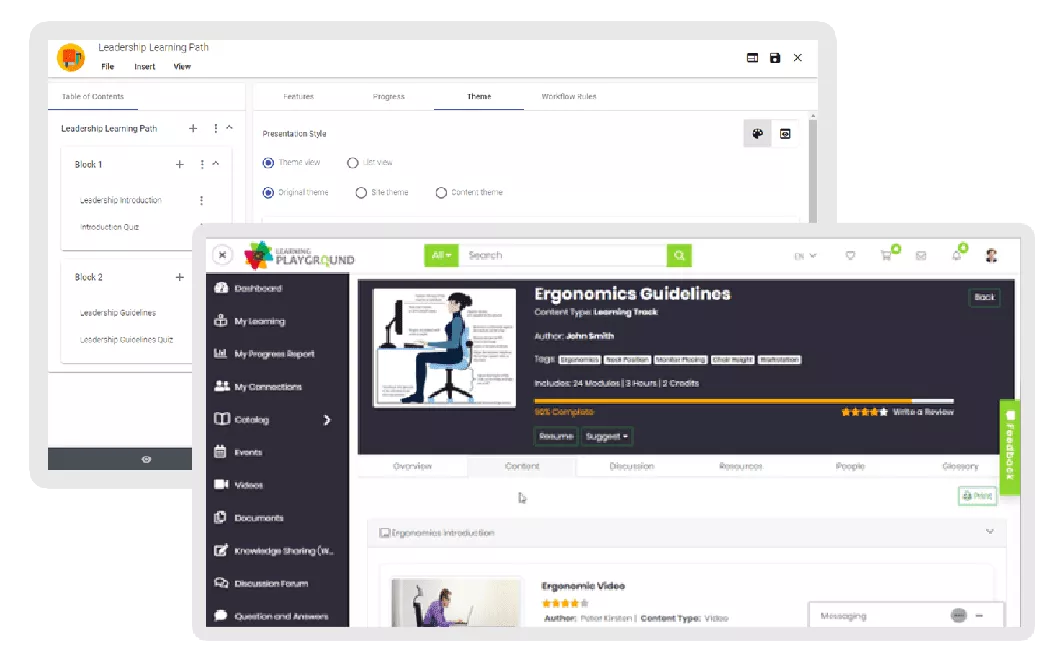
Apply a Theme to Learning Path
- Instancy eLearning content authoring system manages the content and the theme (presentation layer) separately, so you can change the presentation style easily without changing the underlying content
- Select a theme from the theme gallery and customize it as per your brand logo, colors, and style
- Reuse the learning path themes across multiple learning programs
- Theme features include navigation, table of contents, page numbering, discussion forum, and much more

Deliver Learning Paths on Mobile Devices
Learning paths can be viewed through a mobile device just as easily as through a web browser.
Enable users to download the entire learning path or specific content items on the Instancy learning native app.
You’ll want to see it to believe it, but the learning path screen resolution is properly adjusted to the device resolution regardless of the varying screen sizes.

Spaced Learning Rules
- Set the schedule for sending out notifications to the learners
- Edit and customize notification messages

Explore More Assessment and Authoring Tools

Survey Editor
Create and deliver Surveys to complete the learning loop
Read More →
Assessment Editor
Create quizzes and online tests with multiple question types
Read More →
Reports and Dashboards
Analyze learning progress data with ease
Read More →
Microsoft PowerBI Integration
Analyze data through Microsoft PowerBI Plug-in
Read More →“I have been building eLearning courses for over 25 years and when I saw Instancy learning platform, I fell in love with the system. The support team has been great to work with”






 Arabic
 English